Frequently Asked Questions (FAQs)
The FAQ section contains answers to general questions related to the XBee Python Library.
What is XCTU and how do I download it?
XCTU is a free multi-platform application designed to enable developers to interact with Digi RF modules through a simple-to-use graphical interface. You can download it at www.digi.com/xctu.
How do I find the serial port and baud rate of my module?
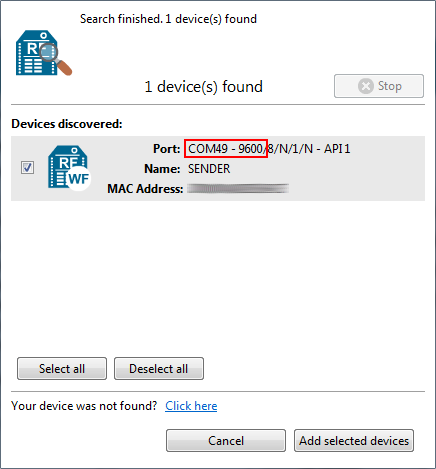
Open the XCTU application, and click the Discover radio modules connected to your machine button.
Select all ports to be scanned, click Next and then Finish. Once the discovery process has finished, a new window notifies you how many devices have been found and their details. The serial port and the baud rate are shown in the Port label.
Note
Note In UNIX systems, the complete name of the serial port contains the /dev/ prefix.
Can I use the XBee Python Library with modules in AT operating mode?
The XBee Python Library only supports API and API Escaped operating modes.
If your devices are using a different operating mode, or even a different serial communication configuration (baud rate, stop bits, etc.), use force_settings=True in the open() method. This parameter tells the library to establish the provided serial settings and change the operating mode to API to be able to work with connected XBee devices. See Open the XBee connection.
I get the Python error ImportError: No module named 'serial'
This error means that Python cannot find the serial module, which is used by
the library for the serial communication with the XBee devices.
You can install PySerial running this command in your terminal application:
$ pip install pyserial
For further information about the installation of PySerial, refer to the PySerial installation guide.